



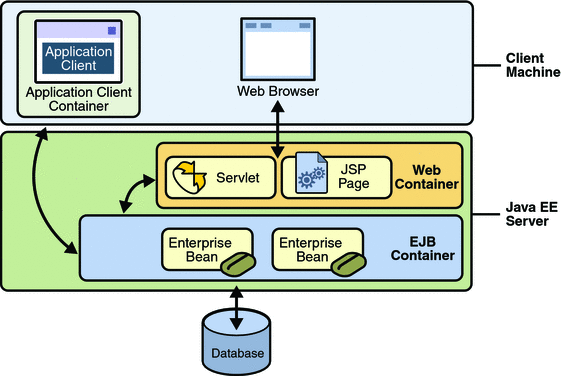

application client container
In today’s fast-paced digital world, efficiency and scalability are paramount. Enter the application client container—an innovative solution that has changed how developers approach software deployment and management. Imagine packaging your applications like a neatly wrapped gift, ready to be delivered anywhere with ease. That’s precisely what application client containers do.
These lightweight, portable units encapsulate everything an application needs to run seamlessly across different environments. This technology simplifies the complexities of modern development while enhancing collaboration among teams. Curious about how you can leverage this powerful tool? Join us as we explore the ins and outs of application client containers, uncovering their benefits, popular platforms, and best practices for implementation along the way!
Understanding Application Client Containers
Application client containers are self-contained environments that package an application along with its dependencies. This encapsulation allows developers to build, test, and deploy applications consistently across various platforms.
At their core, these containers ensure that everything the application requires—libraries, configurations, and runtime—is bundled together. This means you won’t face issues like “it works on my machine” when moving from development to production.
By isolating applications in their own lightweight units, client containers also enhance security. An error or vulnerability in one container doesn’t affect others running on the same host system.
This technology is particularly beneficial for microservices architectures where multiple small services must communicate seamlessly while remaining independent. Understanding how these containers work opens up new avenues for more efficient software development cycles and robust deployment strategies.
Benefits of Using Application Client Containers
Application client containers bring a range of advantages to modern software development. One significant benefit is isolation. Each application runs in its own container, minimizing conflicts and dependencies with other applications. This ensures that developers can work more efficiently.
Scalability is another key advantage. As demand increases, you can easily scale your application by adding or removing containers without disrupting the entire system. This flexibility supports rapid growth and adapts to changing user needs.
Resource efficiency plays a crucial role as well. Containers share the host operating system kernel, allowing for lightweight deployments. This leads to reduced overhead and faster startup times compared to traditional virtual machines.
Additionally, application client containers enhance consistency across environments—development, testing, and production remain aligned. Developers can trust that what works on their local machine will perform similarly in any environment where it’s deployed.
Popular Application Client Container Platforms
Several application client container platforms have gained popularity due to their robust features and ease of use.
Docker is a leading platform, known for its lightweight containers. It allows developers to package applications with all dependencies, ensuring seamless deployment across various environments.
Kubernetes stands out as an orchestration tool that manages containerized applications at scale. It automates deployment, scaling, and operations of application containers across clusters of hosts.
OpenShift offers a powerful enterprise-level solution built on Kubernetes. Its developer-friendly tools enhance productivity while maintaining security and compliance standards.
AWS Fargate simplifies the running of containers without managing servers or clusters. This serverless option allows users to focus solely on building applications rather than infrastructure management.
Each platform has unique strengths tailored for different project needs. Choosing the right one can significantly impact development efficiency and application performance.
Setting Up an Application Client Container for Your Project
Setting up an application client container can seem daunting, but breaking it down into manageable steps makes the process smoother. Start by selecting a suitable platform based on your project needs. Popular options include Docker and Kubernetes, each offering unique features.
Next, define your application’s requirements. Consider aspects like runtime environment and necessary dependencies. This clarity will guide you in configuring the container effectively.
Once you’ve established these parameters, create a Dockerfile or similar configuration file that outlines all components needed to build your container. Be specific about versions to avoid conflicts later on.
After building the image, test it locally before deploying it to production. Ensure everything works seamlessly within the containerized environment to prevent issues during rollout.
Documentation is essential at this stage. Keep track of changes made for future reference or troubleshooting needs as your project evolves over time.
Best Practices for Implementing and Managing Application Client Containers
When implementing application client containers, start with a clear architecture plan. Define your container’s role and how it integrates within your broader system.
Adopt a lightweight approach. Use minimal dependencies to keep performance high and simplify maintenance. This will help avoid bloat that can slow down deployment.
Regularly update your container images. Keeping them current ensures you benefit from the latest security patches and features.
Implement robust monitoring tools to track performance metrics in real-time. This allows for quick identification of potential issues before they escalate.
Automate testing as part of your CI/CD pipeline. Continuous integration helps catch bugs early, ensuring smoother deployments and enhancing reliability.
Document every step of your process thoroughly. Good documentation aids team collaboration and provides clarity for future iterations or troubleshooting efforts.
Troubleshooting Common Issues with Application Client Containers
When using application client containers, issues can arise that disrupt development. Identifying these problems quickly is essential for maintaining workflow.
One common issue involves configuration errors. Ensure environment variables are set correctly and paths are properly defined. A simple typo can lead to headaches down the line.
Another frequent culprit is dependency conflicts. Different libraries may require varying versions of dependencies, leading to runtime failures. Regularly updating your libraries and conducting compatibility checks will save time.
Network connectivity problems can also hinder performance. Double-check firewall settings or proxy configurations if external services aren’t reachable.
Log analysis plays a significant role in troubleshooting. Logs provide insights into what went wrong during execution, helping you pinpoint the exact source of errors more efficiently. Keep logs organized and review them regularly for better diagnostics.
Future of Application Client Containers and Emerging Technologies
The future of application client containers is bright and full of potential. With the rise of cloud computing, these containers are becoming more integral to software development. They provide a seamless way to deploy applications across different environments.
Emerging technologies like edge computing will further enhance their capabilities. As data processing moves closer to the source, application client containers can help manage workloads efficiently in real time.
Another exciting trend is the integration of artificial intelligence into container management systems. AI can automate resource allocation, optimizing performance while reducing human error.
Additionally, as serverless architectures gain traction, application client containers may evolve to support even more scalable solutions without extensive infrastructure overhead. This shift could redefine how developers approach app deployment.
With increased focus on security and compliance in software development, we expect advancements that make managing vulnerabilities within application client containers simpler and more effective than ever before.
Conclusion
Application client containers are revolutionizing the way developers approach application deployment and management. They offer flexibility, scalability, and efficiency that traditional methods simply cannot match. As businesses increasingly rely on cloud computing and microservices architectures, the importance of understanding and utilizing these containers will only grow.
With a variety of platforms available to choose from, setting up an application client container has never been easier. Following best practices ensures optimal performance while minimizing potential issues. Troubleshooting common challenges can also streamline your development process.
As we look ahead, emerging technologies promise to enhance the capabilities of application client containers even further. Staying informed about these advancements will empower you to leverage this powerful tool effectively in your projects.
Embracing application client containers could very well be a game changer for developers seeking innovative solutions in today’s fast-paced tech landscape. Adopting this approach may lead to improved agility and enhanced productivity as you navigate future developments in software architecture.




